Fender Studio Pro 8.2 Adds Trim Automation, Stem Separation and MIDI 2.0
Studio Pro 8.2 adds flexible mix controls, guitar and piano stem separation, faster vocal monitoring and MIDI 2.0 support on macOS and Linux.
Fender Studio Pro 8.2 focuses on practical changes to mixing, recording and arrangement work. Its most useful additions address familiar session friction: adjusting a channel that already has automation, monitoring pitch correction while recording, separating more instrument types, and keeping picture cues aligned as a project’s tempo changes. The update also adds MIDI 2.0 support for compatible equipment, with an important platform limitation for Windows users.
These changes extend Studio Pro’s toolkit for producers working with recorded instruments and electronic parts alike. Here’s what each feature changes in day-to-day use.
Mix adjustments without rebuilding automation
Trim Automation adds a separate level adjustment for a channel or send. It lets you change the overall volume while preserving the automation points already written into the session. That’s useful when a vocal ride or other level move needs a small correction after the detailed automation has been shaped.
Without a trim layer, that kind of adjustment can mean editing the existing automation, adding Mixtool, or routing the channel through a VCA. Those approaches can work, but they add steps or change the structure of the mix. A dedicated trim layer gives the engineer a direct way to shift the automated level while leaving the underlying moves intact.
Dim Solo Mode offers a different kind of mix control. Instead of silencing every other channel when a track is soloed, Studio Pro lowers the other channels by an amount the user chooses. Channels that were already muted remain muted. This makes it easier to inspect a vocal or drum bus while retaining some sense of its level and placement against the rest of the session.
The distinction matters when a sound needs close attention but still depends on context. A vocal heard in isolation can be judged differently from one sitting against the instrumental; dimming the surrounding mix keeps that relationship audible while putting the soloed part in the foreground.
More material for stem work and vocal recording
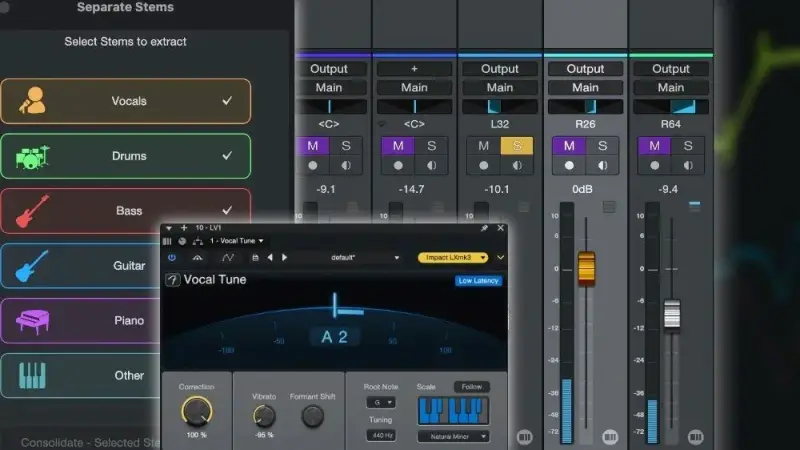
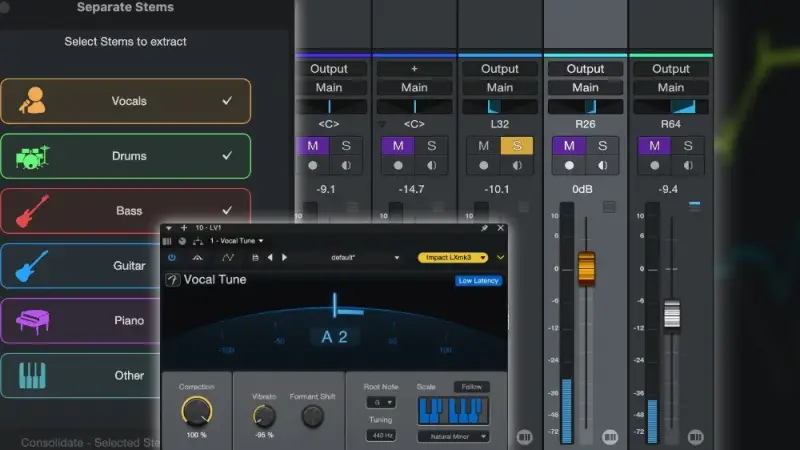
Studio Pro’s stem separation now includes guitar and piano, alongside the stem types available before this update. That broadens its usefulness for transcription, replacing a performance, and sampling. A separated part can give a musician a more focused starting point for working out notes or building a new arrangement from existing audio.
Separation is a source for further work, rather than a substitute for deciding what belongs in the finished production. The practical benefit is having more options when the original recording is a mix and the task calls for a particular instrument. The feature highlights also point to an additional use for the software’s built-in mixer tools, though the details of that demonstration aren’t specified here.
Vocal Tune gains a Low Latency mode designed for recording situations. Fender says the mode keeps plugin latency below 3 ms, allowing singers to hear tuning in their monitor feed while performing. That can make pitch correction part of the monitored sound instead of a process reserved for editing after the take.
A new Follow option changes the plugin’s key automatically when the project’s key information changes. It relies on that information being present on the key signature track, so sessions with a maintained key track can avoid manually automating the plugin’s key parameter. For sessions without that information, the automatic behavior has nothing to follow.
Freeze and marker changes streamline session work
The updated Freeze function renders insert effects while retaining the channel’s volume and pan settings. This reduces the need for a workaround when freezing a processed part but still needing its mix position and level to remain available. It’s a small change with a clear session benefit: freezing can handle more of the insert signal chain without requiring those channel controls to be recreated separately.
There’s also a quicker way to change Audio FX plugins on inserts and sends. Plugins can now be swapped from a menu, rather than requiring a drag-and-drop operation. In a busy mix, that makes it easier to audition a replacement while keeping the session moving.
Multiple Marker Tracks are aimed particularly at scoring to picture. Users can create as many marker tracks as needed, with each track set to timecode or bars and beats. That allows picture-related hit points to stay anchored to timecode when tempo changes, while musical markers follow the arrangement’s bar-and-beat position. Keeping those marker types separate should help when a project needs both fixed visual cues and tempo-dependent musical landmarks.
MIDI 2.0 support arrives on two platforms
Studio Pro 8.2 supports MIDI 2.0 with compatible controllers and instruments. High-resolution velocity and controller data can be viewed in the Note Editor, giving users a closer look at performance information carried by compatible gear. The update supports MIDI 2.0 on macOS and Linux. Windows users will need to wait for Microsoft’s MIDI 2.0 release before using the feature there.
That platform caveat is the main compatibility detail to check before building a workflow around the new MIDI support. For musicians already using compatible equipment on macOS or Linux, the visible high-resolution data adds more detail when editing expressive performances. The other changes address everyday session work across mixing, vocal tracking and picture scoring. Fender’s Studio Pro page has further product information at fender.com/pages/fender-studio-pro.