Quiet Art WaveRider v5 Adds Dialog Mode and VST3/AU Support
WaveRider v5 adds neural speech detection and support for more DAWs, with AAX, VST3 and AU versions for Mac and Windows.
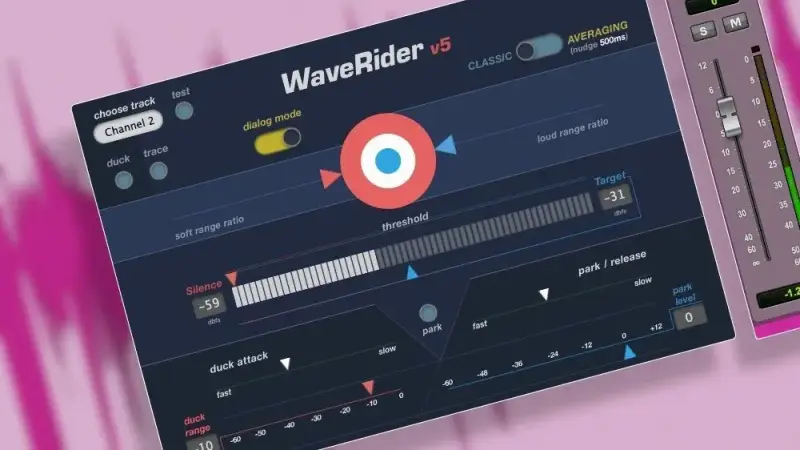
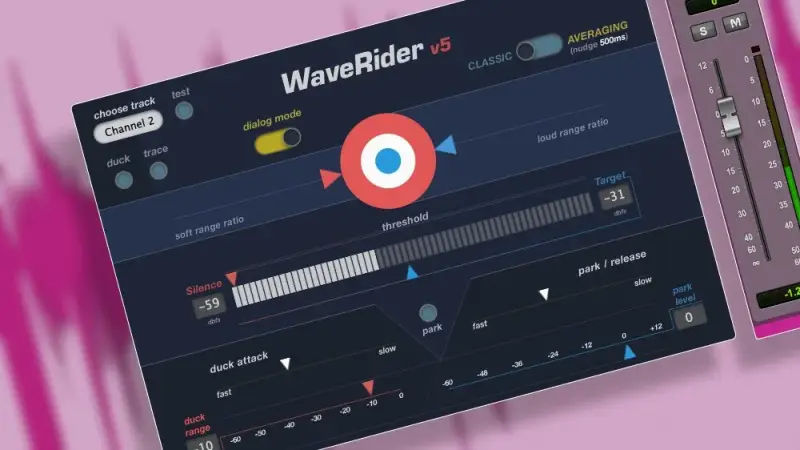
Quiet Art’s WaveRider v5 is aimed at a familiar mix problem: keeping vocals and dialogue at a steady level without spending the session drawing every fader move by hand. The update broadens DAW compatibility and adds Dialog Mode, which uses neural speech detection to distinguish speech from breaths, background noise and room tone.
For engineers who already use automatic gain control alongside fader automation, WaveRider’s approach will feel related but more directly tied to the DAW’s fader. Many gain control processors mainly turn down louder passages. WaveRider can also raise quieter material around a target level, then write those compensating moves through a virtual fader controller. That makes it useful for tracks whose level needs to follow performance without flattening every phrase into the same loudness.
Level rides through a virtual fader
WaveRider is installed and configured as a plugin, but its job is to control the DAW fader like a hardware control surface. It monitors the track level and makes corresponding fader adjustments. The central controls let the engineer set a target level and shape how the plugin responds, while the ride handles routine level changes across the performance.
That distinction matters in a workflow built around fader automation. A conventional automatic gain control processor changes the signal passing through it; WaveRider instead moves the track fader. Engineers can use it to create a more consistent starting point for later processing, or to reduce the repetitive manual work involved in leveling a vocal or dialogue track. It remains a control tool, so its usefulness depends on the target and response settings fitting the material.
Manual automation still gives the engineer direct control over individual moments, but writing every move with a mouse or physical fader can take time, especially when the performance needs continuous rides. WaveRider is designed to take on that ongoing level adjustment, leaving the operator to refine the passages where judgment matters most.
Dialog Mode targets speech between phrases
Dialog Mode is the headline addition for spoken-word sessions. Quiet Art says its neural speech detection separates wanted speech from breaths, background noise and room tone. The aim is to avoid raising the gaps between phrases as the plugin follows quieter sections of a track.
In the demonstration described for v5, Dialog Mode keeps levels steadier between phrases instead of riding up into the silence. It is positioned as an alternative to making repeated small adjustments to the Silence Threshold used by Park mode across a timeline. Quiet Art also claims the mode adds no latency during real-time riding.
For dialogue editors and vocal producers, that behavior could reduce cleanup work on material where pauses and room sound vary from line to line. Speech detection still needs to be judged against the recording: breaths can be part of a performance, and background sound may be intentional. The practical question is whether Dialog Mode follows the wanted phrases closely enough to reduce editing without requiring extensive correction afterward.
More DAWs and calibrated fader response
WaveRider supported Pro Tools alone for 17 years. Version 5 adds VST3 and AU alongside AAX, extending the plugin to more DAW setups. Quiet Art also supplies new fader taper calibrations for Logic Pro, Nuendo, Cubase, Reaper, Studio Pro and DaVinci Resolve Fairlight.
Fader taper describes how a fader’s movement corresponds to changes in level. Calibrating WaveRider for the supported DAWs is intended to make its automated moves behave more like an engineer’s familiar response to that DAW’s fader. For studios working across different software, those calibrations and the expanded formats should make the plugin easier to slot into existing sessions.
WaveRider v5 runs on Mac and Windows. One licence covers both operating systems, so a user can move between a Mac studio and a Windows edit suite without buying a second licence.
WaveRider v5, TG and LoudnessGracious
Quiet Art also offers WaveRider TG v2 and LoudnessGracious v1.1, both of which now have dialogue modes. The key workflow difference is where automation happens: WaveRider v5 controls the DAW’s fader, while WaveRider TG writes automation to its own internal volume parameter. TG is therefore suited to self-contained rides, while v5 is built to operate as a virtual DAW fader controller.
WaveRider TG supports AAX, VST and AU. LoudnessGracious is available in AAX format only, so users working outside Pro Tools who want Dialog Mode will need WaveRider v5 or TG. These distinctions are worth checking before choosing a version, particularly in studios that share sessions across multiple DAWs.
Prices, licensing and audio handling
WaveRider v5 costs $199. Owners of WaveRider 4 can upgrade for $45, which includes the VST3 and AU versions, the new fader taper calibrations and Dialog Mode. WaveRider TG costs $139, with a $30 upgrade for owners of the original TG. LoudnessGracious costs $99.
All prices are in US dollars. Quiet Art’s end-of-year sale discounts its plugins through 18 December 2026. Licences require a free iLok account and support cloud authorization, so an iLok dongle isn’t required. Quiet Art says licences can’t be de-authorized after purchase and that it doesn’t offer refunds; the company recommends trying the plugins before buying.
Quiet Art says Dialog Mode processes speech detection on the user’s computer. According to the company, audio isn’t uploaded to a server or used for AI training. That local processing may be relevant to studios handling client recordings.
WaveRider v5 looks most useful where consistent vocal or dialogue levels are a recurring task and manual rides consume session time. Its expanded formats open the fader-control workflow to more DAWs, while Dialog Mode focuses the level adjustment on speech. A trial on representative session material is the sensible way to judge how well its detection and fader response fit a particular workflow.