AutoTune Advanced: Three Ways to Shape Vocal Vibrato
AutoTune Advanced can preserve natural vibrato through fast tuning, add vibrato to straight notes, or reshape a singer’s existing expression.
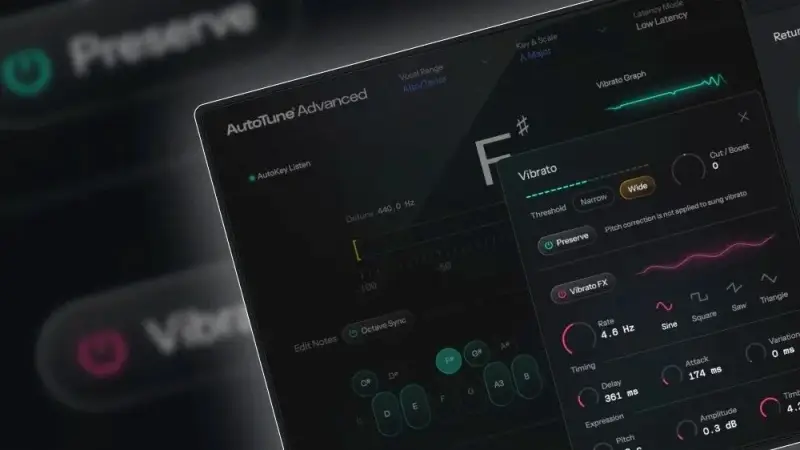
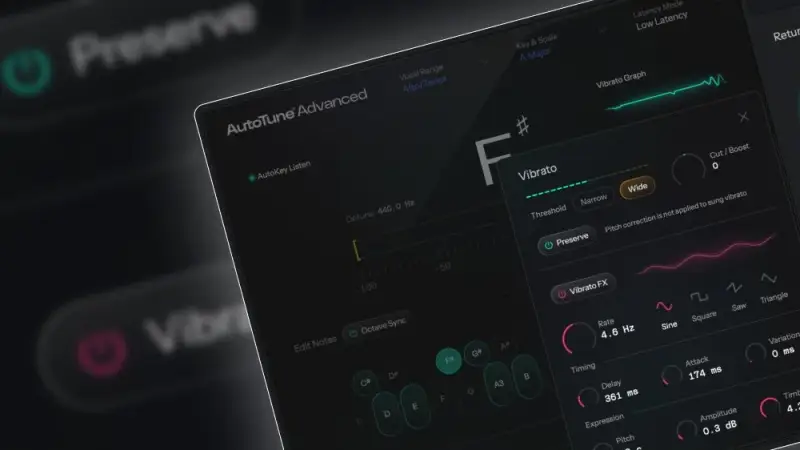
Fast pitch correction and expressive vocal vibrato can sit in the same mix. AutoTune Advanced’s DVA engine is designed to help with that balance: it can protect a singer’s natural vibrato while correcting other pitch movement, and its Vibrato FX controls can add or reshape vibrato when the performance needs a different contour. For producers working between tightly tuned pop vocals and more open performances, those are three distinct ways to manage expression without treating every note the same.
Antares positions AutoTune Advanced as a focused alternative to the deeper editing available in AutoTune Pro’s Graph Mode. It retains Classic and Modern operating modes, while adding DVA and an updated Vibrato FX panel. The company also describes the plugin’s engine as more efficient and its correction as more accurate than before; those are Antares’ claims, rather than independently stated measurements.
1. Keep natural vibrato through fast tuning
At fast Retune speeds, pitch correction can pull a singer’s notes toward their target quickly. That sound may suit a deliberately hard-tuned part, but the same setting can also suppress small pitch changes that give a sustained vocal its natural movement. DVA’s Preserve control addresses that tension by detecting and protecting the singer’s vibrato while the plugin corrects the rest of the performance.
In practice, this gives the producer another option when a tightly corrected vocal feels too static. Preserve can be enabled while keeping a fast Retune setting, allowing the pitch treatment and the singer’s natural expression to coexist. The result still depends on the performance and the correction settings, but the control is aimed at a specific studio problem: keeping vibrato audible without giving up the chosen tuning character.
That distinction matters on exposed notes, where vibrato often carries much of the vocal’s shape. A producer can assess whether the held notes retain their movement, then decide whether the overall correction needs adjustment. DVA’s role is to protect that movement as pitch correction works elsewhere in the take.
2. Add vibrato to a straight note
When a singer delivers a note with little or no vibrato, AutoTune Advanced’s Vibrato FX can generate vibrato as an effect. That can provide more movement to a sustained phrase when the recorded performance is intentionally straight or simply needs additional expression in the arrangement.
The control set also lets the engineer increase or reduce the vibrato already present in the recording. Cut and boost can shift the amount of the singer’s existing vibrato, so the treatment can be subtler or more pronounced. This gives the producer a middle ground between leaving the performance untouched and adding a new effect from scratch.
As with any vocal processing, the useful setting depends on the line. A small change may be enough to give a sustained note more motion, while a stronger setting can make the effect a more obvious part of the sound. The practical advantage is that the producer can work with the recorded performance’s expression or create movement where the source has little.
3. Sculpt the vibrato’s shape
The redesigned Vibrato FX panel includes a real-time visual graph for shaping the effect. The graph makes the vibrato contour visible as it is adjusted, including the option to begin from straight notes and build a shape from there. That visual feedback can help when the desired movement calls for more control than simply raising or lowering the amount.
These controls support different vocal approaches. A restrained setting can keep a line close to the singer’s original delivery; a more shaped effect can give a sustained note a deliberate contour. The panel is presented for use across genres, though the musical choice remains in the producer’s hands. Listening in context is still the way to decide whether the effect supports the phrase, especially when several vocal layers share the same arrangement.
More controls for session and live work
Vibrato is the focus here, but AutoTune Advanced also includes tools that affect how the plugin fits into a session. Its 78-note Visual Keyboard is intended for quick note selection, and Octave Sync applies note edits across octaves. A revised key and scale workflow is designed to make those choices quicker to navigate mid-session. The plugin is also compatible with AutoKey 2 for key and scale detection.
For performers and engineers who want hands-on control, MIDI Perform can map a MIDI controller to parameters including vibrato, Retune Speed, Humanize and Flex-Tune. The source describes this as useful for expressive mix automation or live control. Advanced also adds Live Latency mode for real-time tracking or stage use, alongside linked Transpose and Formant controls covering a range of plus or minus 12 semitones.
Those features sit alongside Classic and Modern modes, giving users a choice of correction behavior. Antares also includes presets created by GRAMMY-winning artists and engineers. Together, the controls make AutoTune Advanced relevant to sessions where pitch correction needs to respond to the character of a performance, whether that means preserving vibrato, dialing it back, or adding it to a note that began straight.
For producers, the useful takeaway is that vibrato no longer has to be treated as an unavoidable casualty of fast tuning. DVA’s Preserve control, the amount controls and the shape graph offer separate ways to work with that expression. Antares lists AutoTune Advanced’s product details here.